
Aimplan AI Assistant
Moving from building read-only Power BI reports to configuring a planning and forecasting solution, where end users enter data instead of only reading it, can feel like a mountain to climb. You need to decide which planning tables to set up, which dimensions they carry, which measures planners will enter, which scenarios to open, and then build all of it in Aimplan and in the semantic model so that it fits with what is already there. None of these decisions is hard on its own. Getting all of them right the first time, and in the right order, is what takes the time.
Today we are releasing two things that make that climb easier and faster. The Aimplan AI Assistant in the Administration Portal works through it with you, the way a consultant would: it reads your semantic model, proposes the planning tables, measures and scenarios, gives advice grounded in the Aimplan help center, and helps you extend a solution you already have. The Aimplan MCP server brings the same knowledge to the AI tools you already use on your own machine, right where your reports and models live. Both are available now, as a beta, to every Aimplan instance.
We are at FabCon Barcelona this week. Come to booth #28 and we will set up a planning model on your own semantic model while you watch.
Note: Everything below works on semantic models in Microsoft Fabric and in Power BI. We say Fabric for brevity.
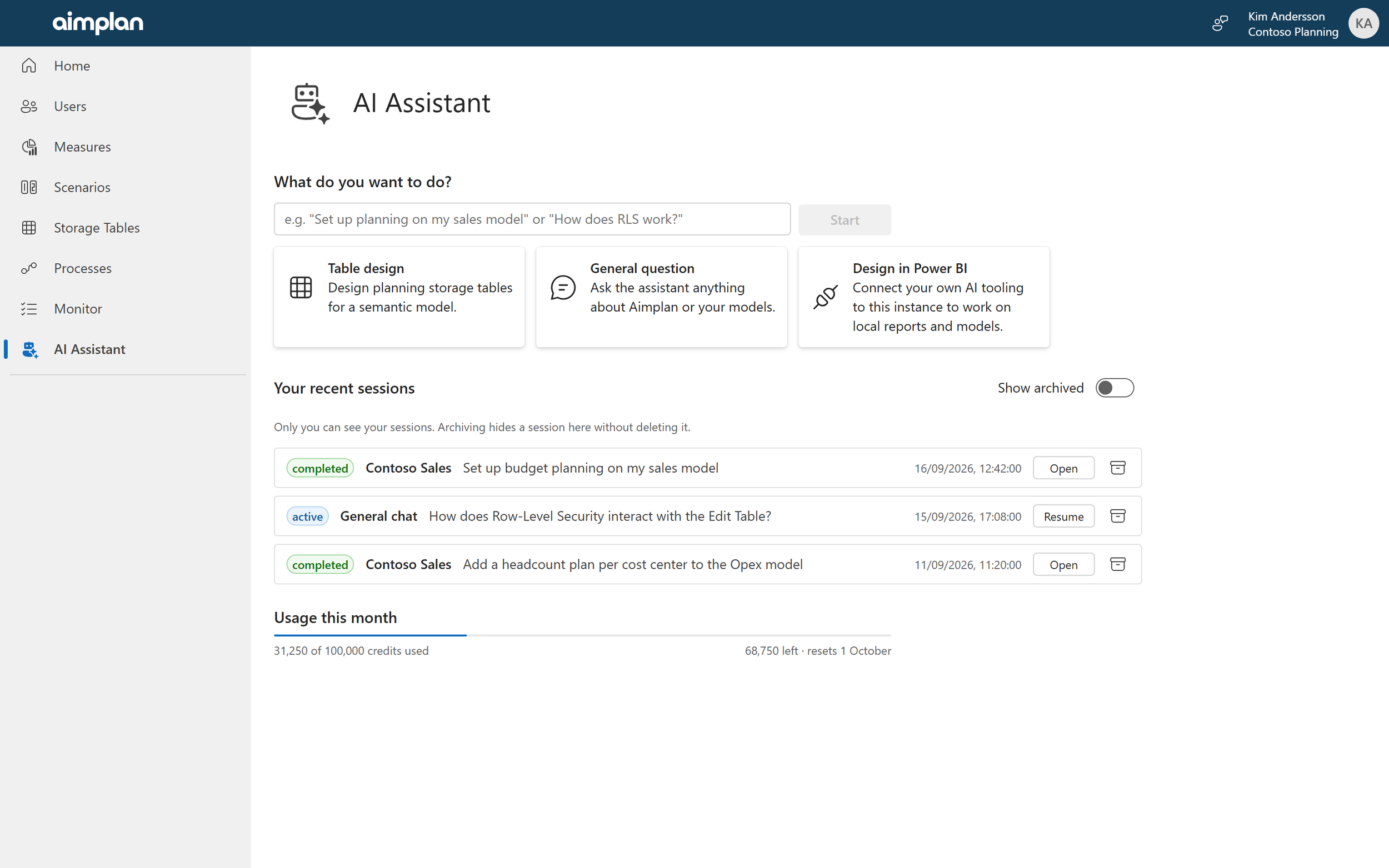
Open AI Assistant in the portal and say what you want in plain language: "set up budget planning on my sales model". The assistant asks for the semantic model, reads its structure, checks what already exists in your Aimplan instance, and asks the two or three questions a consultant would ask before proposing anything: at what grain will planners enter numbers, which dimensions matter, is a new master-data list needed.
Then it proposes a design, and this is the part we care most about: nothing is created until you have seen it and agreed. Each decision arrives as a card you can edit before confirming.
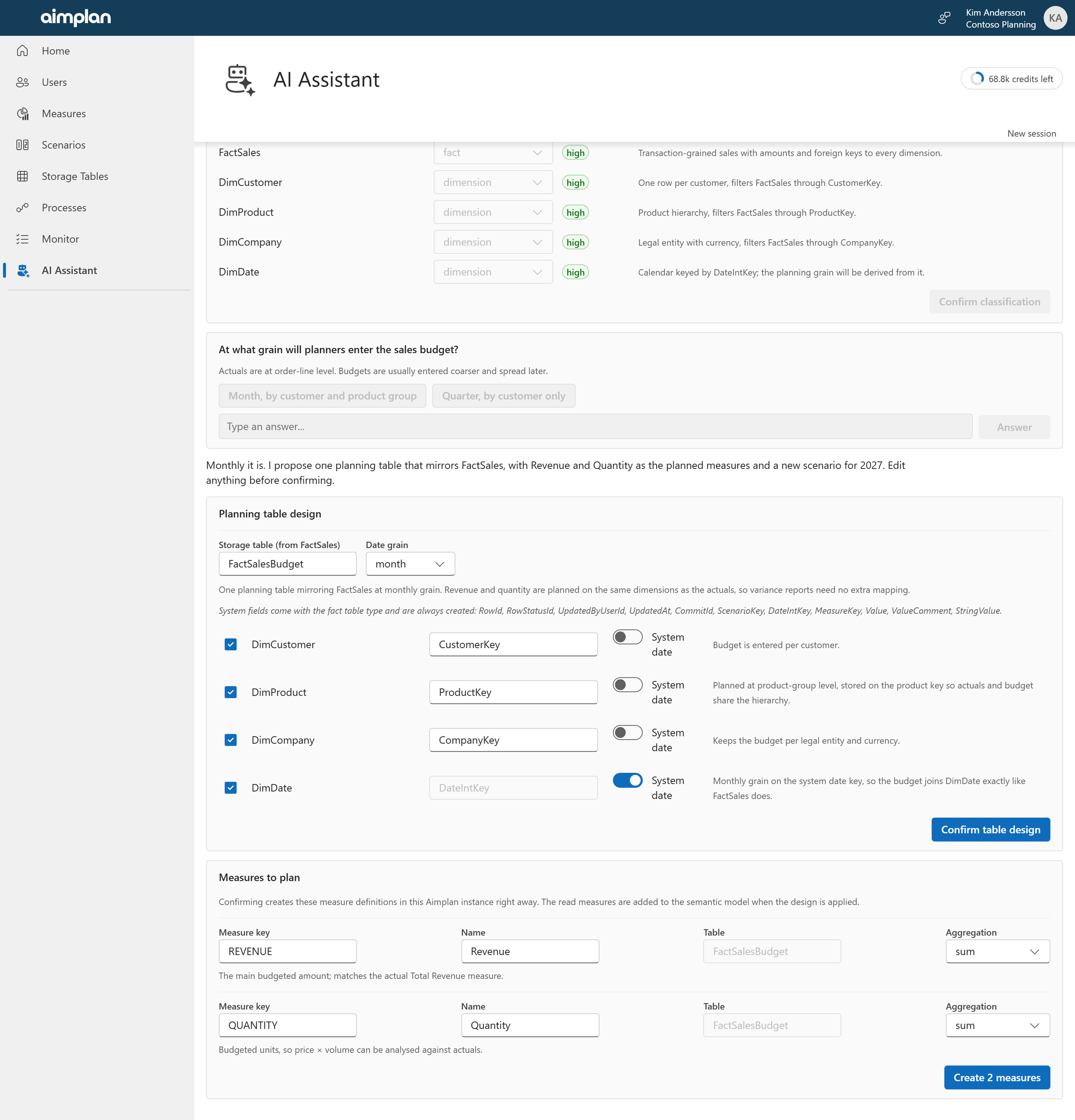
How it reads your model: which tables are facts, which are dimensions, with its reasoning and how confident it is.
The planning table itself: which fact it mirrors, the time grain, which dimensions it carries.
Any new dimension your plan needs, such as a list of initiatives or projects that does not exist in the model yet.
The measures planners will enter, and the scenarios to plan into.
Your edits win. Rename a table, drop a dimension, change the grain, and the assistant continues from your version, not its own.
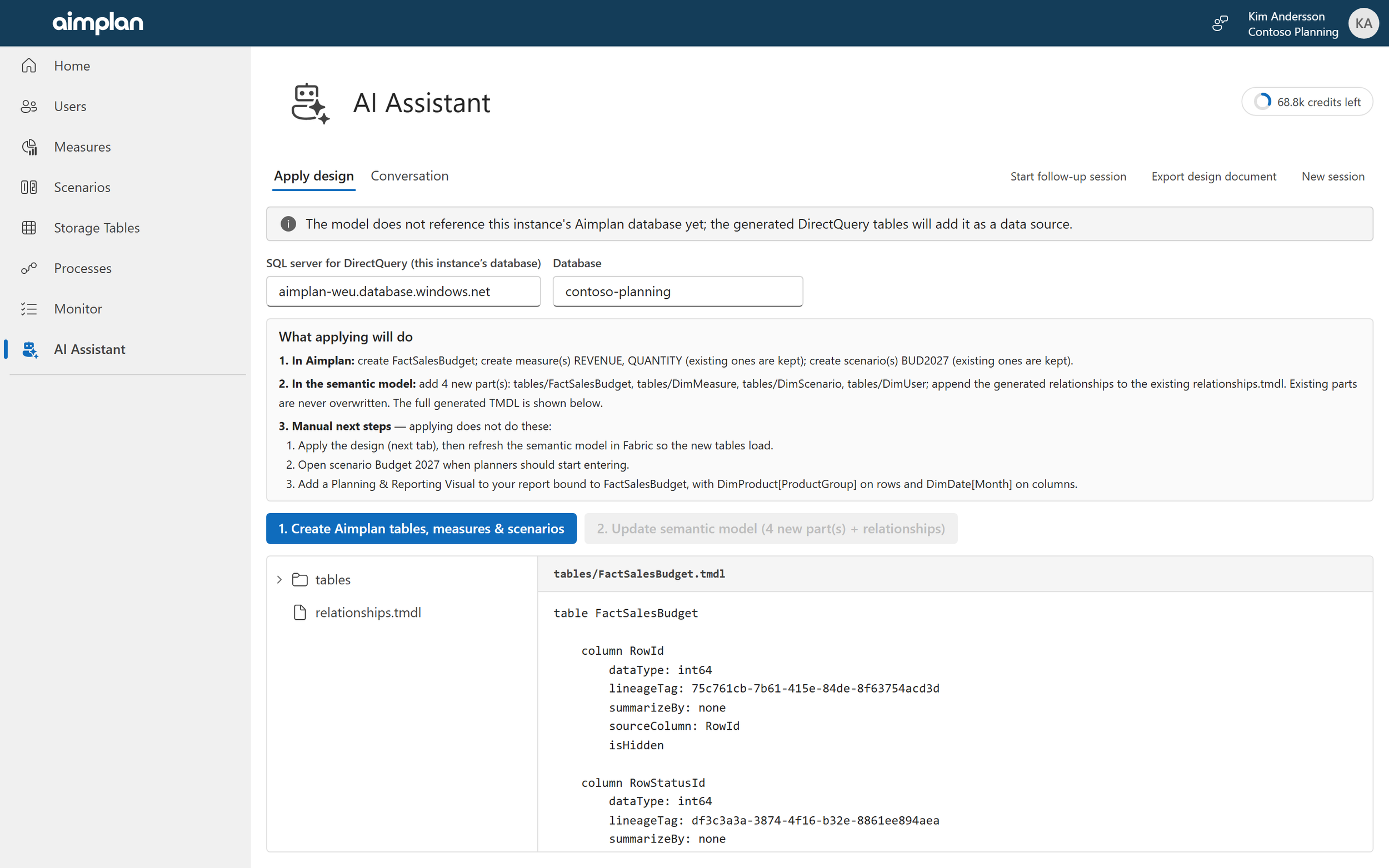
When the design is confirmed, one screen spells out exactly what will happen in Aimplan, what will be added to the semantic model, and what remains for you to do by hand. Two clicks later the storage tables, measures and scenarios exist in Aimplan and the semantic model has the matching tables, write-back measures and relationships, built the way Aimplan's own documentation says they should be. Existing parts of your model are never overwritten, and applying twice never duplicates anything. After a refresh, the model is ready for the Aimplan visuals.
Every session ends with a design document you can download: the goal, the decisions and why they were taken, the tables, measures, scenarios and next steps. It is the implementation documentation you would otherwise have written afterward, and you can pick it up in a later session to extend the design.
A consultant who has read the whole help center
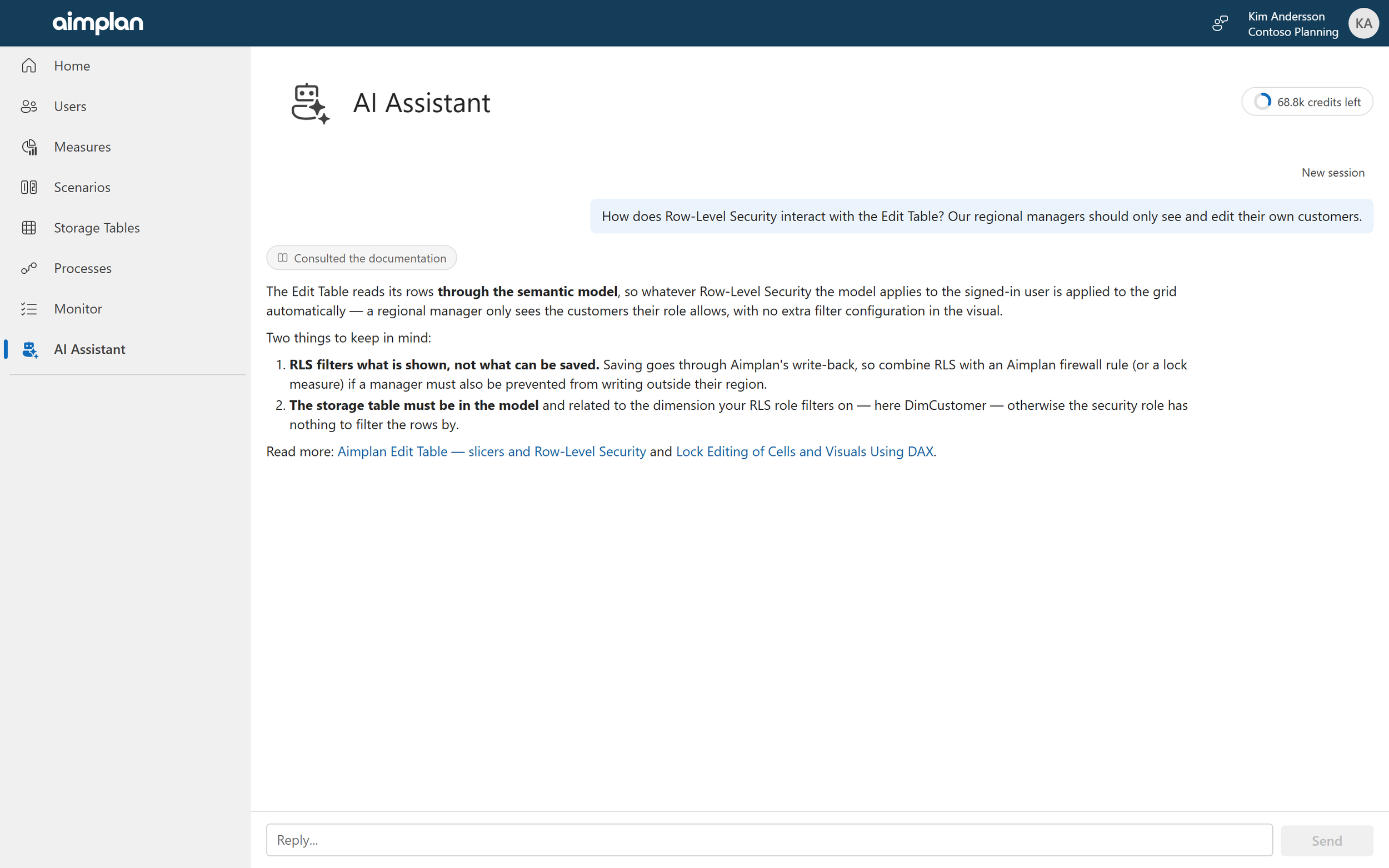
The assistant is not only a designer. Ask it anything about Aimplan: how Row-Level Security interacts with the Edit Table, why a cell shows a checkered pattern, how to set up a rolling forecast. It looks the answer up in the Aimplan help center and cites the articles, rather than answering from memory. When something in your setup does not work, it walks through the layers where an Aimplan setup can fail, from the model to the visual to saving and refresh, and it can look at your instance's actual storage tables, measures, scenarios and processes to check the setup against what is really there.
Bring your own AI: the Aimplan MCP server
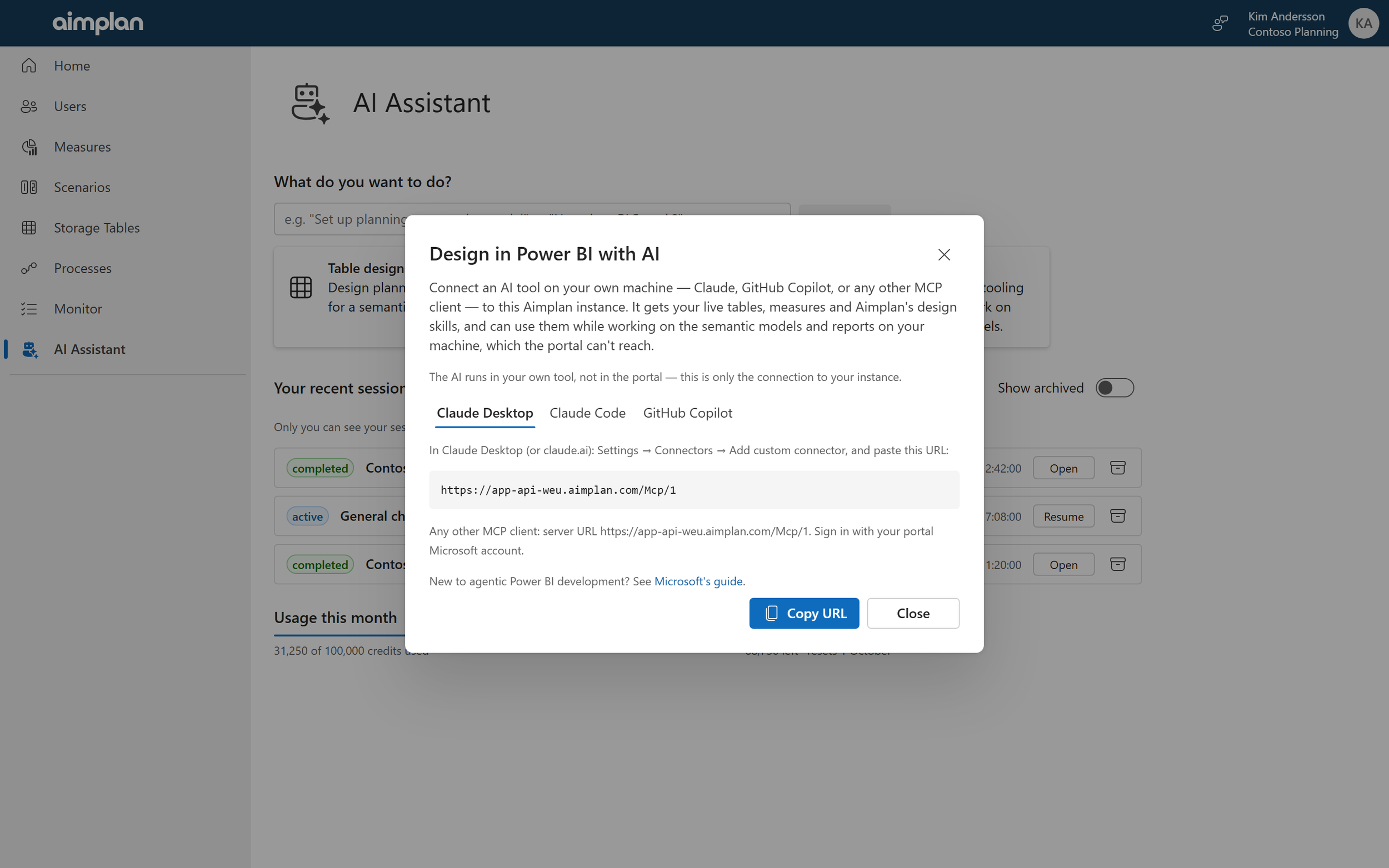
The portal assistant only works on the semantic model in Fabric. It can't reach the report you have open in Power BI Desktop, the model you're editing on your laptop, or the PBIP project in your git repository. But the AI tools many of you already use there can.
Aimplan now runs an MCP server for every instance. Connect Claude, GitHub Copilot or any other tool that speaks MCP (Model Context Protocol, the open standard for giving AI tools access to systems) and it gains what the portal assistant has: your instance's live storage tables, measures and scenarios, the complete Aimplan help center, and Aimplan's design know-how packaged as skills. The same planning table, dimension and measure skills the portal uses, plus skills the portal does not have: configuring the Planning & Reporting Visual, the Edit Table and the Data Input Table in a report, laying out P&L reports, and authoring report pages with Aimplan visuals.
Your AI can create storage tables, measures and scenarios in the instance, then carry on with the model and report on your machine in one continuous piece of work. Changes to tables that already hold data are previewed, with row counts, and need your explicit go-ahead before anything runs.
Connecting takes a minute: pick Design in Power BI on the AI Assistant page and copy the address for your tool. Sign in with the same Microsoft account you use for the portal. Because the AI runs in your own tool, it uses no Aimplan AI Credits and works even on instances that have not switched the portal assistant on. New to agentic Power BI development? Start with AI tooling for Power BI development.
Built for organizations with an AI policy
We expect the first question from most IT departments, so here is the answer up front.
Metadata only, never your numbers. What leaves Aimplan is the conversation, the structure of the semantic model you attach (tables, columns, measures, relationships), the structure of your Aimplan instance (table definitions and the names of measures, scenarios and processes) and Aimplan's own documentation. The assistant does not read rows from the model or from Aimplan tables, and it never sees your list of portal users.
Not used for training. The assistant is powered by Anthropic's Claude. Metadata sent to Anthropic is not used to train models, under Anthropic's commercial terms and the EU standard contractual clauses. The full terms are shown when the feature is enabled and supplement the agreements at aimplan.com/legal.
Your conversations stay yours. They are stored in your own instance database. Only the person who started a session can open it. Sessions can be archived but never deleted, so every credit spent can be traced back to the conversation that spent it.
Off until you say so. The assistant is switched off by default and needs an administrator to accept the beta terms before anyone in the instance can use it.
Usage and pricing during the preview
Portal assistant usage is metered in Aimplan AI Credits. Each instance has a monthly allowance, shown on the AI Assistant page and in the session header. The meter warns when most of it has been used, and when the allowance is reached the assistant pauses until the next month. Contact us if you need more. The MCP server is not metered: the AI, and its cost, are in your own tool.
Getting started
The AI Assistant and the MCP server are released as a beta. We will change them as we learn from the first customers, and the uptime guarantee in the Service Level Appendix does not apply to them during the beta.
To enable the assistant: an administrator opens Feature toggles in the portal, switches on AI Assistant and accepts the Aimplan AI Feature: Beta Program Terms. The assistant then appears in the navigation and on the Home page.
Who can use it: Super Administrators and Consultants, for both the assistant and the MCP server. Applying a design also requires permission to edit the semantic model in Fabric.
To connect your own AI: open the AI Assistant page, pick Design in Power BI, and follow the one-minute instructions for your tool.
We would love to hear how it works for you. Tell us what it gets right and what it gets wrong on the feedback board, or in person at booth #28.
